• When You Need Gravel

    From our Gravel Pit, we are ready for you to pick up in your small truck or container, or we can deliver to your home or business.
  • Products & Service

    We provide Sand, Gravel and Fill to homeowners and contractors alike, across Durham Region and Kawartha Lakes
  • 1
  • 2

Need Sand, Gravel or Fill? Lets us Quote your job.. Contact Us


Regular Hours: 6:30 - 4:45 | Winter Hours (Dec- May) 6:30 - 4:00 | 905-986-4343

Martyn Haulage - Blackstock - Oshawa - Kawarthas

Martyn Haulage gravel pit has been supplying and delivering aggregate to Durham Region and Kawartha Lakes for over 30 years. Some of our aggregate stone, gravel and fill products include:

Oshawa Whitby Sand Soil delivery

   Sand Gravel Oshawa Drain stone
   Limestone Oshawa Limestone
   Limestone Screenings Oshawa Limestone screenings
   Topsoil Screened Oshawa Topsoil, screened topsoil
   River Rock Stone Oshawa River Rock
   Peastone Oshawa A Gravel
   Garden Soil Poting Oshawa B Gravel
   Triple Mix Delivered Oshawa Brick sand, Cable sand
   Septic Sand Delivered Port Pery Septic sand and stone
   Garden Mulch Deliverd Oshawa Courtice Filter sand , Beach sand
   Gabion Rip Rap Oshawa Whitby Gabion stone
   EEquestrian Riding arena sand footing Equestrian Riding arena sand footing

See our Products and Services for complete aggregate product information and delivery details. We also offer trucking and truck rental services available upon request.

From our Gravel Pit, we are ready for you to pick up in your small truck or container, or we can deliver to your home or business.

We provide Sand, Gravel and Fill to homeowners and contractors alike, across Durham Region and Kawartha Lakes including: Port Perry, Scugog, Lindsay, Bowmanville, Courtice, Oshawa, and Whitby, Ajax, Pickering, Markham, Stouffville.

The Style Settings panel in the Gantry based theme administration interface provides several options for configuring the main built in stylistic aspects of the template.
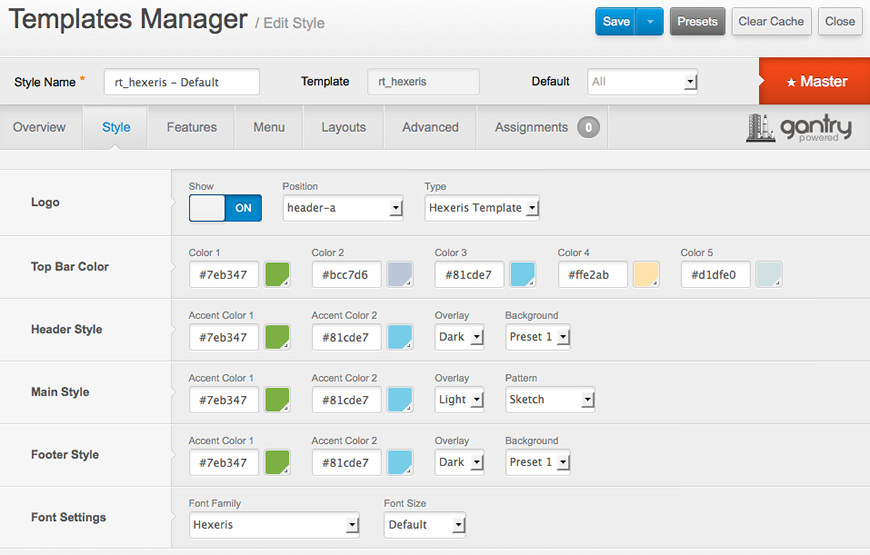
Style

Gantry also provides the ability for you to create your own custom presets based on any parameter in the theme administrator. You should determine which parameters you wish to configure to be a part of the presets.


Assigning a Style

With Gantry, the ability to assign a certain style to an individual page has never been easier and/or more efficient. Just follow these simple steps:

  • Go to Extensions → Template Manager → rt_hexeris → Assignments → *Menu Item*
  • Select your preset from Show Presets, configure and save.

After setting your defaults to the desired values, select the Menu Items button and choose the menu item you wish to modify the parameters for. You will then see a series of checkboxes on the left of all the supported parameters.

Select the checkbox next to the parameter you wish to modify, it will then become active, and you can modify as you wish. Clicking “Save” in the toolbar will then save this configuration.

Gantry Framework: Style Configuration
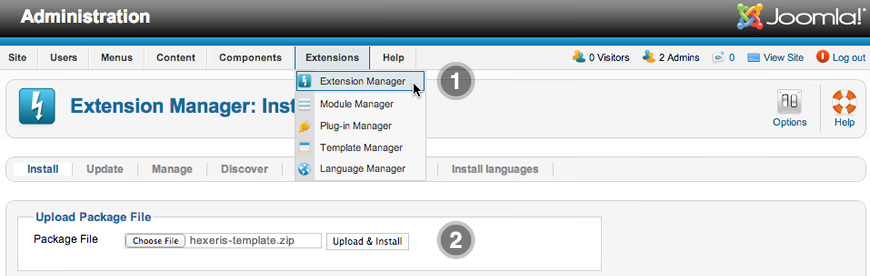
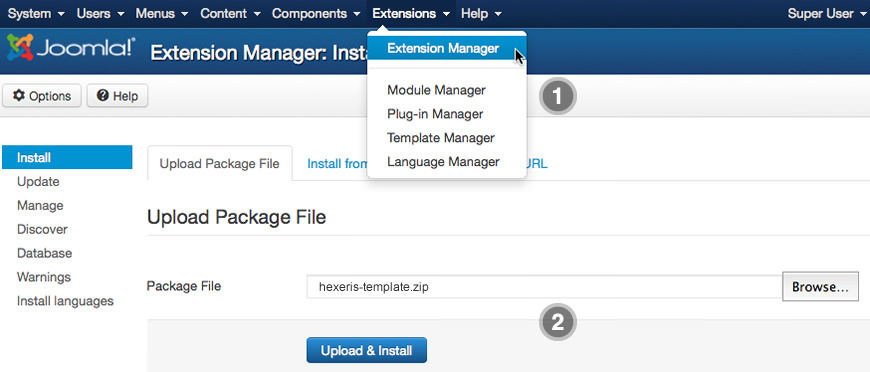
The following is a guide that covers how to set up your new Hexeris template on your Joomla! site. Here you can find an overview of the files included in the Hexeris release and instructions on installing and activating the template in your Joomla! install.

Note: The Bundle Template is only necessary if the Gantry Library is not installed at /libraries/gantry directory.


Step 1 - Installation

  1. Install from Admin → Extensions → Extensions Manager
  2. Browse for hexeris-template.zip and click Upload & Install
Image

Image
 

Step 2 - Template Default

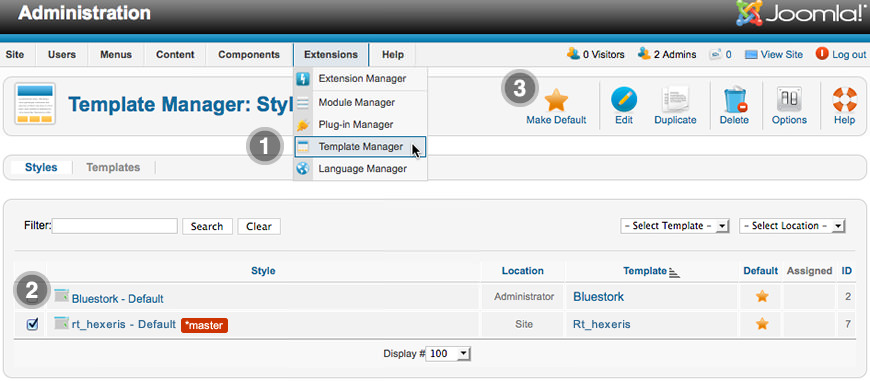
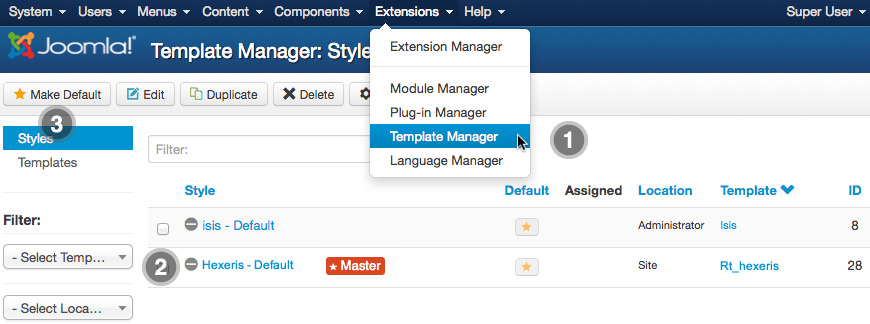
  1. Make the template default at Admin → Extensions → Template Manager
  2. Select rt_hexeris
  3. Press Make Default
Image

Image
 

RocketLauncher Instructions

We always recommend installing a RocketLauncher first to trial and understand the template more effectively. It must be installed as new, and not over an existing Joomla install.


Step 1 - Upload

  • Download the RocketLauncher
  • Unzip the file
  • Upload the created folder to your server

Note: You can upload all the files via FTP, or use cPanel or SSH to upload the zip and unzip directly onto the server. Enquire with your hosting provider.


Step 2 - Installation

1. The Logo Picker

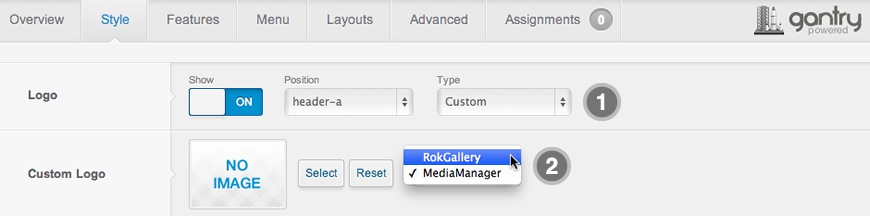
  1. Enable Logo and set to Custom at Admin → Extensions → Templates Manager → rt_hexeris → Features.
  2. Set Logo Picker to either RokGallery or MediaManager.
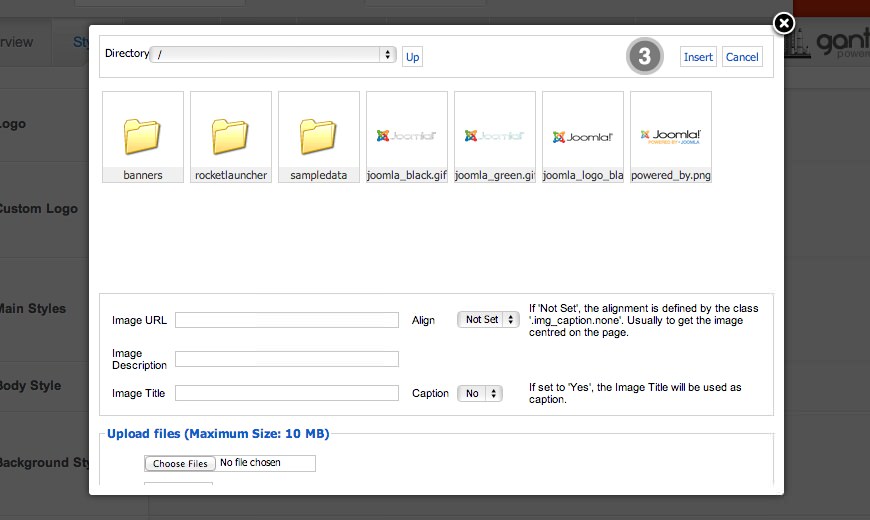
  3. Select your logo, Insert and Save

Logo Panel
 

Select Logo
 

2. Manual Change

  1. Enable Logo and set Type to Hexeris.
  2. Upload logo.png and logo-icon.png to the
    /templates/rt_hexeris/images/logo/ directory
  3. Clear your browser cache and refresh.

If you cannot see your new logo, ensure you have uploaded it to the right directory and the directory permissions are writeable. Enquire with your hosting provider.

Download Sources Here

Hexeris for Joomla is a RocketTheme Joomla Template Club release featuring the revolutionary Gantry Joomla Template Framework. Gantry is a comprehensive set of building blocks that enable the rapid development and realization of a design into a flexible and powerful web platform template.

To configure the template, navigate to Extensions → Template Manager → rt_hexeris. Mouseover the labels to view a description of each parameter.